ArchiveOld post. Originally published 2 August 2011 on the WordPress version of this site. Preserved here for the search engines and the curious. Old me had opinions.
Skipping characters whilst using nano over SSH from OS X Lion 10.7
Ever since upgrading to OSX Lion 10.7 I’ve been pulling my hair out. I spend a fair bit of time connected via SSH to remote servers using Terminal, ever since the upgrade when using Nano on a remote server I would get skipped characters and all sorts of wacky behaviour.
There is a fix!
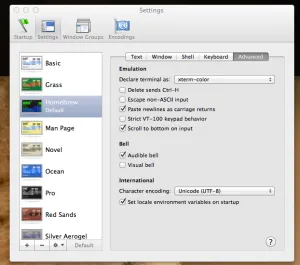
Sneakily Apple changed the default way in which Terminal presents itself to remote servers, but you can go back!
Open Terminal and go to the Preferences (CMD+,) Hit Advanced and under emulation change “Declare terminal as” to xterm-color instead of xterm256-color.
Job Done
Filed under Geek. No comments, on purpose.