Quick Tip: Rename your iOS Device without iTunes
Today my shiny iPad Mini arrived. It is lovely, light and small, but that isn’t the point of this. When I was setting it all up I was restoring from a iCloud backup of my iPad 2. I noticed that it had copied across my device name. As I wanted to change this I had to do a little digging.
There are 2 official ways of doing this, the first with iTunes which I didn’t want to do. The second isn’t exactly well known but you can change your device name from the device itself. This was added in iOS5.
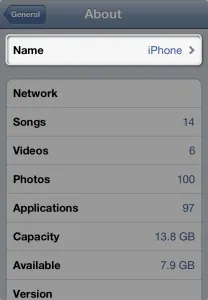 Go to Settings->About and you will see your device name. You can simply click your Name and update it. Just remember if you are doing iCloud backups you will need to backup again using the new device name and it will overwrite any previous backups with the old name.
Filed under Geek. No comments, on purpose.